⚡ TL;DR — Email Etiquette in 30 Seconds
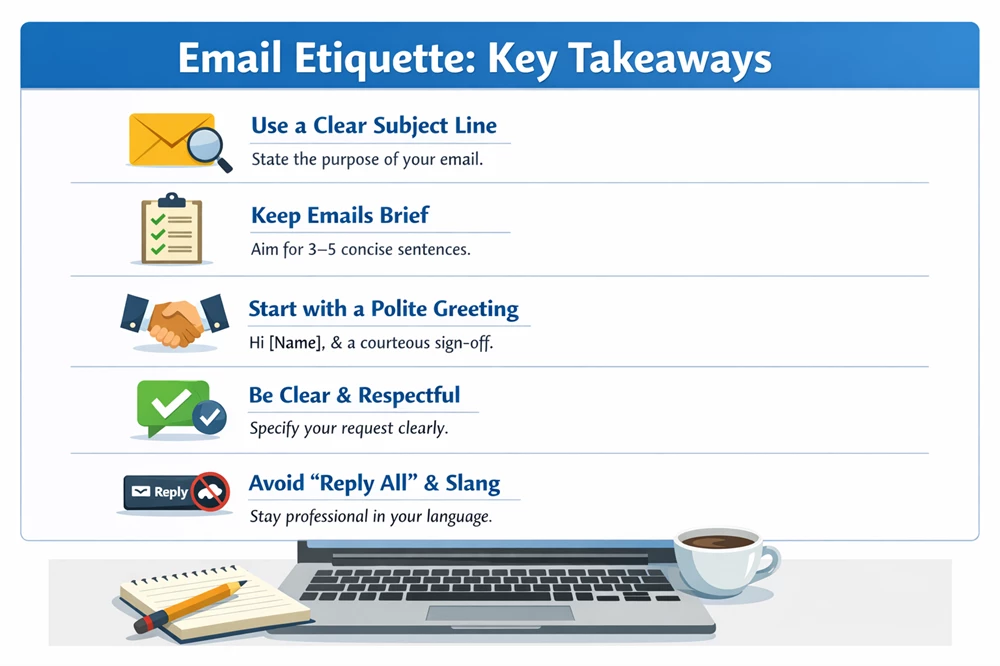
- Use a clear subject line so the reader instantly knows the purpose.
- Keep emails short and focused — ideally around 3–5 sentences.
- Start with a simple greeting like Hi [Name] and end with a polite closing.
- Be clear and respectful about what you want or what action is needed.
- Avoid unnecessary Reply All, vague wording, or overly casual language.
In the professional world of 2026, your email is often the first “handshake” you have with a client, manager, or recruiter. While messaging apps like WhatsApp have made us more casual, professional email remains a space where etiquette matters.
When we teach learners at 99Learners, we analyse common communication gaps. Using the wrong tone doesn’t just look unprofessional—it can actually slow down your career growth. Here are 10 rules to ensure your emails are modern, respectful, and effective.
Table of Contents
10 Professional Email Etiquette Rules
1. The “Greeting” Balance
Avoid being too stiff or too casual.
Too Stiff: “Respected Sir/Madam” (This feels outdated in global business).
Too Casual: “Hey!” or “Yo!”
The 2026 Standard: “Hi [Name],” or “Dear [Name],” is perfect for almost every situation. If you don’t know the person’s name, “Hi Team,” works well.
2. The 5-Sentence Rule
Long emails often go unread. Respect the recipient’s time by keeping your message concise. Most professional emails can be handled in five sentences:
The Greeting.
The Context (Why are you writing?).
The Call to Action (What do you need?).
The Deadline/Next Step.
The Sign-off.
Example Email Using the 5-Sentence Rule
Subject: Request for Project Update Meeting
Email:
Hi Rahul, (Greeting)
I hope you’re doing well. (Polite opening)
Could we schedule a 15-minute meeting this week to review the progress of the website redesign project? (Main request)
Please let me know if Wednesday or Thursday afternoon works for you. (Action / next step)
Thanks,
Anita (Polite closing)
3. Use a Clear, Actionable Subject Line
Recruiters and managers often have 100+ unread emails. Your subject line should tell them exactly what is inside.
Bad: “Question” or “Hello.”
Good: “Feedback Required: Q1 Marketing Proposal” or “Application for Content Writer – [Your Name].”
Examples of Effective Email Subject Lines
- Job Application: Application for Marketing Executive Position – Rahul Sharma
- Hiring / Interview: Interview Invitation – Content Writer Role (March 20)
- Deadline Reminder: Reminder: Report Submission Due Tomorrow (March 18)
- Project Update: Weekly Project Update – Website Redesign Progress
- Information Request: Request for Sales Data for Q1 Report
- Document Sharing: Attached: Final Budget Proposal for Review
💡 Tip for you:
Good subject lines are specific, short (5–8 words), and clearly state the purpose of the email.
4. The “Reply All” Danger
Only use “Reply All” if everyone on the thread truly needs to see your response. If you are only thanking the sender, a direct reply is much better. This prevents “inbox clutter.”
5. Be Careful with “ASAP”
While “ASAP” (As Soon As Possible) is common, it can sound demanding or rude in some cultures.
Better: “I would appreciate a response by Wednesday,” or “Whenever you have a moment this afternoon.”
6. “Softening” Your Language
In English, direct commands can sound like “orders.” Use “softeners” to sound more collaborative.
Direct: “Send me the file.”
Professional: “Could you please share the file when you have a moment?” or “I was wondering if you could send over the file.”
| Casual/Direct | Professional/Softened |
| I want a meeting. | I would like to schedule a brief meeting. |
| You made a mistake. | There seems to be a slight oversight in this section. |
| I can’t do that. | Unfortunately, I won’t be able to accommodate that request. |
7. The Professional Sign-off
End your email with a clear closing.
Safe Choices: “Best regards,” “Sincerely,” or “Thank you.”
Avoid: “Cheers” (too casual for new clients) or “Sent from my iPhone” (looks like you didn’t proofread).
8. Proofread for “Tone,” Not Just Grammar
Before hitting send, read your email aloud. Does it sound angry? Hurried? Cold? If you are writing while frustrated, save the email as a draft and look at it again in an hour.
9. Use CC and BCC Correctly
CC (Carbon Copy): For people who need to stay “in the loop” but don’t need to take action.
BCC (Blind Carbon Copy): Use this when emailing a large group of people who don’t know each other to protect their privacy.
10. Acknowledge Receipt
If someone sends you a detailed report or a long email, don’t stay silent. Even a simple “Got it, thanks! I’ll review and respond by [day/time],” builds massive trust.
When Not to Follow These Rules
While these email etiquette rules work well in most professional situations, there are times when flexibility is appropriate. For example, startup teams, close colleagues, or internal chats may use shorter and more casual emails. In some formal settings, such as government offices or traditional organisations, more formal greetings like Dear Sir/Madam may still be expected.
The key is to adapt your tone to the context, workplace culture, and relationship with the recipient. When in doubt, it’s safer to stay slightly more professional and clear than overly casual.